
The Samsung Gaming Hub Hopes To Capitalize Upon Ever-Improving Cloud Gaming Tech
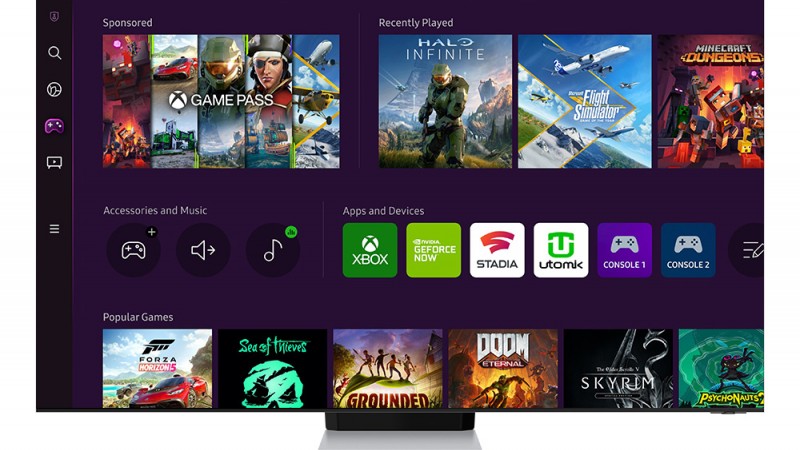
Samsung and Xbox have announced, earlier this month that Xbox Cloud Gaming joins the likes GeForce Now and Utomik to offer another game streaming service as part of their Samsung Gaming Hub. The update will be available on all 2022 Samsung smartTVs from June 30. The demo was live and I got to play Halo Infinite, Flight Simulator and other games to gain a better understanding of the hub’s capabilities.
With this update, all 2022 Samsung TV users can now access different media and gaming portals. From its earlier iterations, the Media Hub was redesigned to be more focused on streaming video apps like Hulu and Netflix. Gaming Hub will be the main addition to the TV update. In this all-new section, you can access a special screen designed specifically for gamers – in particular, cloud gamers.
You can pair the controller you prefer (PlayStation and Xbox as well as many other third-party Bluetooth devices) and access your Xbox Cloud collection (available via Game Pass Ultimate, Stadia and GeForce Now titles and Utomik cloud games). You can also access Xbox Live chat at launch. There may be more options available shortly.
At the top of the screen, you see the games you most recently played across all your cloud-gaming platforms – at least the supported ones mentioned above. The Samsung team didn’t answer my question about whether the new investments in cloud streaming by PlayStation through consolidation of PlayStation Plus and Now means that we will see it on TVs. It was more like a pipedream at the moment, considering how Sony wants you to purchase their TVs and consoles. It’s still a great feature that games from different services are displayed in the same “Recently Finished” queue, if you have Game Pass Ultimate. You can select the game you would like to play and then seamlessly switch to the appropriate service.
Under that row, you’ll find the Apps and Devices panel. Here you can connect physical consoles or devices to your TV’s HDMI ports. This demo shows me an Xbox logo. But, my team informs me that this would be the same if I connected a Switch or PlayStation. The “Recently Played” row does not include games that you have played on local console hardware. Although technical issues prevent this from happening, it would make life easier if there was one queue. The screen also features rows of featured videos from YouTube Gaming and special collections that group your cloud library into categories. Special game detail pages point you to the services that have the game that you are looking for.
After the demo ended, I tried my hand at Microsoft Flight Simulator. You should note that my connection was hardwired on the Summer Game Fest private network. Based on my use case, however, latency and resolution were quite good. Although my brain was slow to adapt to Infinite’s slight input latency, after about a minute I was grapplingshotting on enemies and taking out their heads with equal efficiency as when I play the game on my Xbox at home. Flight Simulator was a particular highlight, due to the way that the game heavily relies on the cloud and streams its data from local copies. It’s also one of only a few exclusive first-party Xbox titles. It performed admirably on my Samsung Samsung screen, and there were only minor issues in Manhattan that I saw.
I’m still not 100 percent sold on cloud gaming – I’d much rather play a local copy of a game for better resolution and less latency – but the Samsung Gaming Hub feels like it’s on to something, particularly for the crowd that wants to buy a new TV, but either can’t afford or can’t find a new console. Although I am not currently in the market to buy a new TV, the dedicated area that is geared towards what I do most on my screens will make it a great choice. And with game streaming technology improving every day, who knows. Maybe by the time I need a new TV, I’ll further buy in on that delivery method.
#Samsung #Gaming #Hub #Hopes #Capitalize #EverImproving #Cloud #Gaming #Tech




