
Xbox Insider Release Notes – Beta (2206.220502-2200)
Xbox Insiders, The Beta ring will soon receive a new Xbox Update preview. It’s important we note that some updates made in these preview OS builds include background improvements that ensure a quality and stable build for Xbox consoles.
We continue to post these release notes, even when the noticeable changes to the UI are minimal, so you’re aware when updates are coming to your device. You can find more details below.
System Update Details:
- OS version: XB_FLT_2206CO22000.4898.220502-2200
- It is available: 2 p.m. PT – May 5, 2022
- Mandatory: 3 a.m. PT – May 6, 2022
Fixed
The hard work and dedication of Xbox engineers has allowed us to make the following improvements to this build.
System
- Numerous updates were made to accurately reflect different languages throughout the console.
- Note: Users participating in Preview may see “odd” text across the console, for more information go here.
Common Issues
Some issues were mentioned in the previous Xbox Insider Release notes. These items aren’t being ignored, but it will take Xbox engineers more time to find a solution.
We’re still tracking these known issues:
Controllers
- We’ve received some reports that users’ controllers are randomly losing sync or disconnecting from the console. This behavior can be reported after you reconnect.
- Some users reported that their Guide access was not possible using the Xbox button from the Razer Turret.
- Workaround: To access the Guide, you can use either the Windows key (or even Windows key +X) instead of pressing the Xbox button.
Guide
- The audio mixer may not be able to adjust the level of chat/game sound. We are currently investigating.
HDMI-CEC
- We’ve received some reports that HDMI-CEC is not working correctly.
- Note: Before you submit feedback, make sure your TV is compatible with HDMI-CEC.
Home
- Some users reported that an icon representing a disc-based title does not appear on their dashboard.
My Games & Apps
- Titles in collection may incorrectly appear with a “trial” tag.
Networking
- We’ve received reports that some users are unable to connect to their network when booting up the console. We’re aware of the problem and are investigating.
- Workaround: Go to Network Settings and select “Test Network Connection” and the console should connect to the network without an issue. If that doesn’t work rebooting the console should resolve the behavior.
- Note:After rebooting the console, submit the issue via Report A Problem.
Shop
- Some users have reported seeing a “flicker” when navigating/browsing the Store catalog.
- We’ve received reports that trailers are not playing on product pages.
TV/Display
- Some people have claimed that the console’s display is not at the correct resolution during boot. We’re aware of the issue and are investigating.
- Note:This behavior can be reported via Report a Problem. Include the model and make of your TV/Display description.
- Workaround: Restarting the console via the Power menu (Holding down the Xbox button displays the power menu) should resolve the behavior. If not, ensure you are looking at the troubleshooting here, specifically the section about ensuring your TV firmware is up to date.
Use it! Report a problem to keep us informed of your issue. We may not be able to respond to everyone, but the data we’ll gather is crucial to finding a resolution.
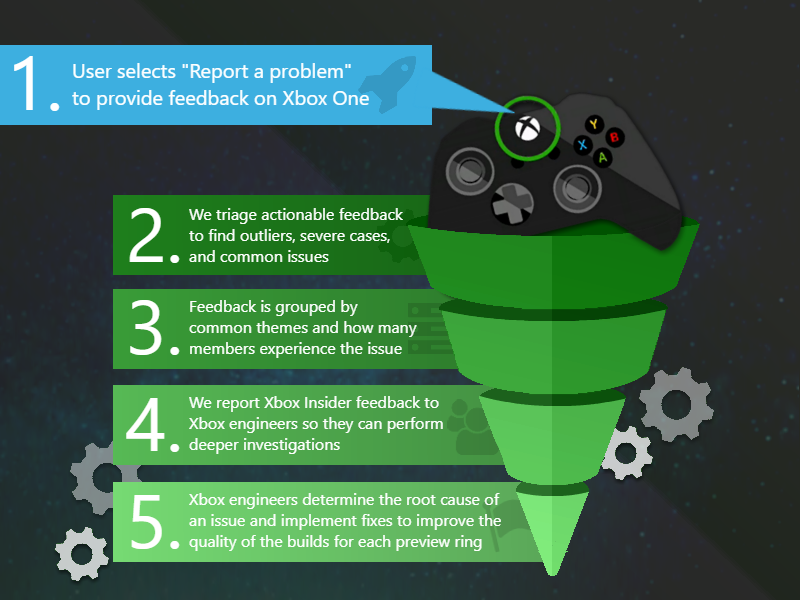
Xbox Insider Support – How can you do it
If you’re an Xbox Insider looking for support, please reach out to the community subreddit. Xbox Insiders, moderators and official Xbox staff are available to assist with any concerns.
To see whether your problem has been discussed or posted to the subreddit before you submit, be sure to look at all of the posts. Before posting anything new, we recommend that you add to the threads already discussing the issue. We will be able to help you as best we can. Don’t forget to use “Report a problem” before posting—the information shared in both places helps us understand your issue better.
Every Xbox Insider who has been active in this subreddit, we are very grateful. It has been a community-driven, friendly hub for support and conversation.
Follow us for more information about the Xbox Insider Program Twitter. For more details about your Xbox Update Preview Ring, keep an eye out for future Xbox Insider Release Notifications!
#Xbox #Insider #Release #Notes #Beta





