
God Of War: Ragnarok Accessibility Features Detailed In New Blog Post
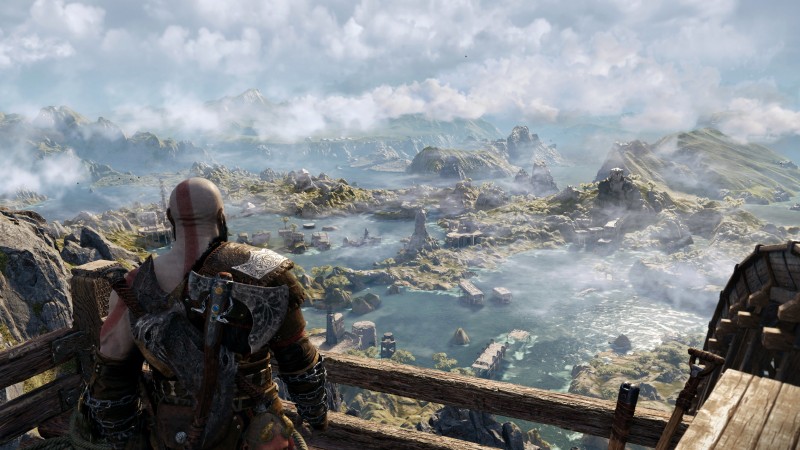
Santa Monica Studio lead UX designer Mila Pavlin has detailed God of War: Ragnarok’s accessibility features in a new PlayStation Blog post to celebrate Global Accessibility Awareness Day.
The blog post highlights a selection of the upcoming games’ 60-plus accessibility options designed to suit players’ needs ranging from subtitle and caption improvements to text and icon size, and more. Accessibility features in any game are an important part of ensuring that everyone can enjoy an experience, and it’s nice to see SMS highlight these options in a dedicated blog post.
“Not only have we redesigned our UI to allow for more flexibility and readability, but we have also rebuilt controller remapping from the ground up and added more customization to our combat and interaction systems,” Pavlin writes in the blog post. “We have retained all of our accessibility features from 2018’s God of War and expanded upon them to include more than 60 ways to adjust gameplay to best suit your style and needs.”
Here’s a breakdown of the accessibility features highlighted in Pavlin’s blog post:
Four accessibility features are returning from Ragnarok’s PC-version of God of War:
- Sprint Auto SprintThis allows you not only to press the stick forward to activate auto sprint, but also to set how long the run will last.
- The Persistent dot (Always On reticle)This keeps a reticle visible on the screen at all times, for people who need it.
- Aim StyleThis allows the player to toggle between holding and aiming.
- Block StyleYou have the option to toggle or hold on/off your shield stance.
Here are some accessibility features that Ragnarok has just added:
Subtitle Improvements and Caption Enhancements
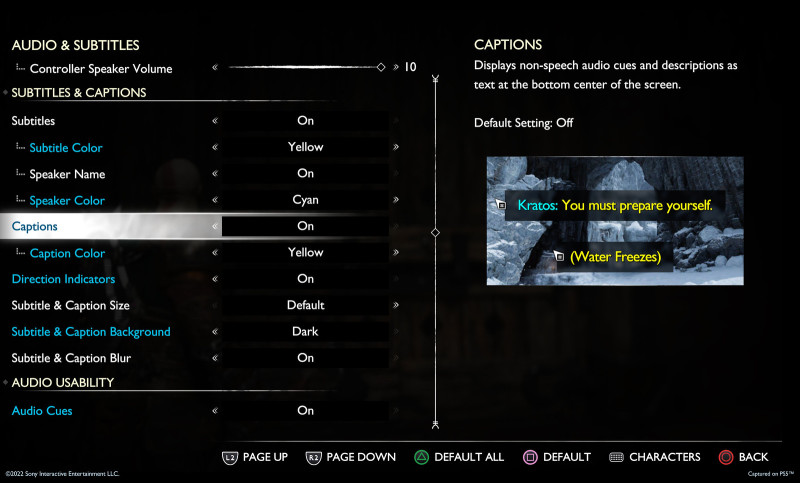
- The Subtitle and the Caption SizeNew scaling options and a new minimum text size have been implemented for SMS. A larger text area will be used to ensure that the game conforms with TV subtitle and movie sub-standards.
- Caption and Subtitle ColorsYou can now change the color of subtitle text and speaker names individually. Seven colors will be available.
- Speaker names: As in God of War you can display or hide the speaker’s names. You also have control over how large you want your UI text to be.
- CaptionsPavlin writes that SMS now offers several ways for players to better understand the sounds in their games. The studio has added captions to both cinematics and gameplay “to provide a rich understanding of the soundscape of the world.” Players can also enable captions for critical gameplay information to assist with puzzles and narrative understanding.
- Blur of the Subtitle Background and CaptionAs an option, SMS can blur the background behind captions and subtitles so that they are easier to understand.
- Subtitle BackgroundFor better snow readability, you can darken your background like in God of War. You can also choose from multiple levels of opacity.
- Direction IndicatorOptional direction indicators will be available for critical gameplay sounds. This indicator shows where the sound is coming in. Pavlin explains that the indicator is also useful for puzzles that use sound cues. It will assist you in orienting towards an important sound source.
Size of text and icons
“The highly requested feature from God of War (2018) is back and better than ever,” Pavlin writes. “You asked for a comfortable reading experience when playing from a couch, so we listened. With a fully re-engineered and responsive UI, and a larger minimum text size that can scale significantly, reading on-screen text is easier than ever.”
Here’s a look at SMS’ default and XX-Large game wide UI text scaling for reference (the first image is the default):
And here are two examples of in-game icon scaling – the first image shows the smallest icon and the second image shows the largest:
Controller Remapping
“We have rebuilt our controller remapping system to allow you to customize your button configurations in God of War: Ragnarok,” Pavlin writes. “There will be a wide range of preset layouts, as well as custom controller remapping support. For select actions that are more complicated, individual buttons can be changed and you can also choose from an existing preset list to create alternate layouts. We offer multiple ways for you to customize your experience for certain actions that require more than one button, including Touch Pad Shortcuts for things like Spartan Rage, Navigation Assist, and Quick Turn.”
High Contrast Mode
Pavlin says Ragnarok’s new high contrast color mode allows players to apply a color to in-game objects like targets, enemies, and other characters, in addition to item types. This will make the character or object more prominent against the background if activated. To enhance this effect, you can also optionally desaturate your background.
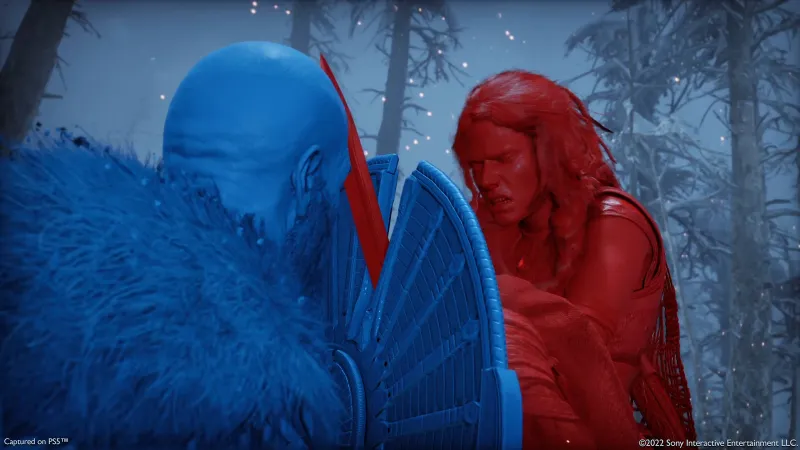
- Customization of High Contrat ActivationFor gameplay, you can choose to turn off, switch on or keep it on (excluding cinematics). You can toggle high contrast mode on or off with a single swipe. Pavlin writes that the mode will be disabled automatically when you go to a character or settings menu.
- Customization of High Contrast Colours: Choose a color scheme that suits your style and then adjust the colors of characters, enemies and other items.
- High Contrast Background CustomizationIndividually, you can choose between darkened or mid-tone background contrast levels.

Other Accessibility Features
- Navigation AssistThe Ragnarok camera navigation system, which allows you to direct your view toward the current goal on the compass, is a new feature. To orient yourself towards the next story objective, press the Navigation Assist key when you are not engaged in combat.
- For assistance in travelingAutomation of gap jumping, vaulting or mantling can be done by simply pressing the button.
- Assistance+: This setting allows for interaction such as crawling, climbs, or squeeze-through.
- Audio Clues: Pavlin says SMS has “linked a sound cue to each of the on-screen “interact” prompts so that when using this feature, you can hear when an interact icon is nearby, as well as when the button prompt becomes active.” These cues extend to unblockable attack rings, targeting aim cues, and weapon swap cues, too, and the volume of individual cues can be adjusted independently of one another.
“We are committed to improving accessibility and customization for everyone,” Pavlin writes. “We can’t wait to tell you details about our other categories of accessibility features like combat/aim assists, puzzle/minigame assists, HUD adjustments, camera tuning, auto pick up, and much more. Our accessibility consultants, as well as the wider accessibility community, have been so supportive in making God of War: Ragnarok an accessible God of War. We can’t wait to share more with you as we get closer to launch.”
While waiting to learn more, read about how Amazon is reportedly developing a live-action God of War series, and then read about how God of War: Ragnarok’s delay may have been due to an actor’s surgery. This amazing cover for the God of War vintage comic book was created by an ex-Rockstar Games artist.
Which Ragnarok event are you excited for? Please share your excitement with us in the comments section below.
#God #War #Ragnarok #Accessibility #Features #Detailed #Blog #Post





